
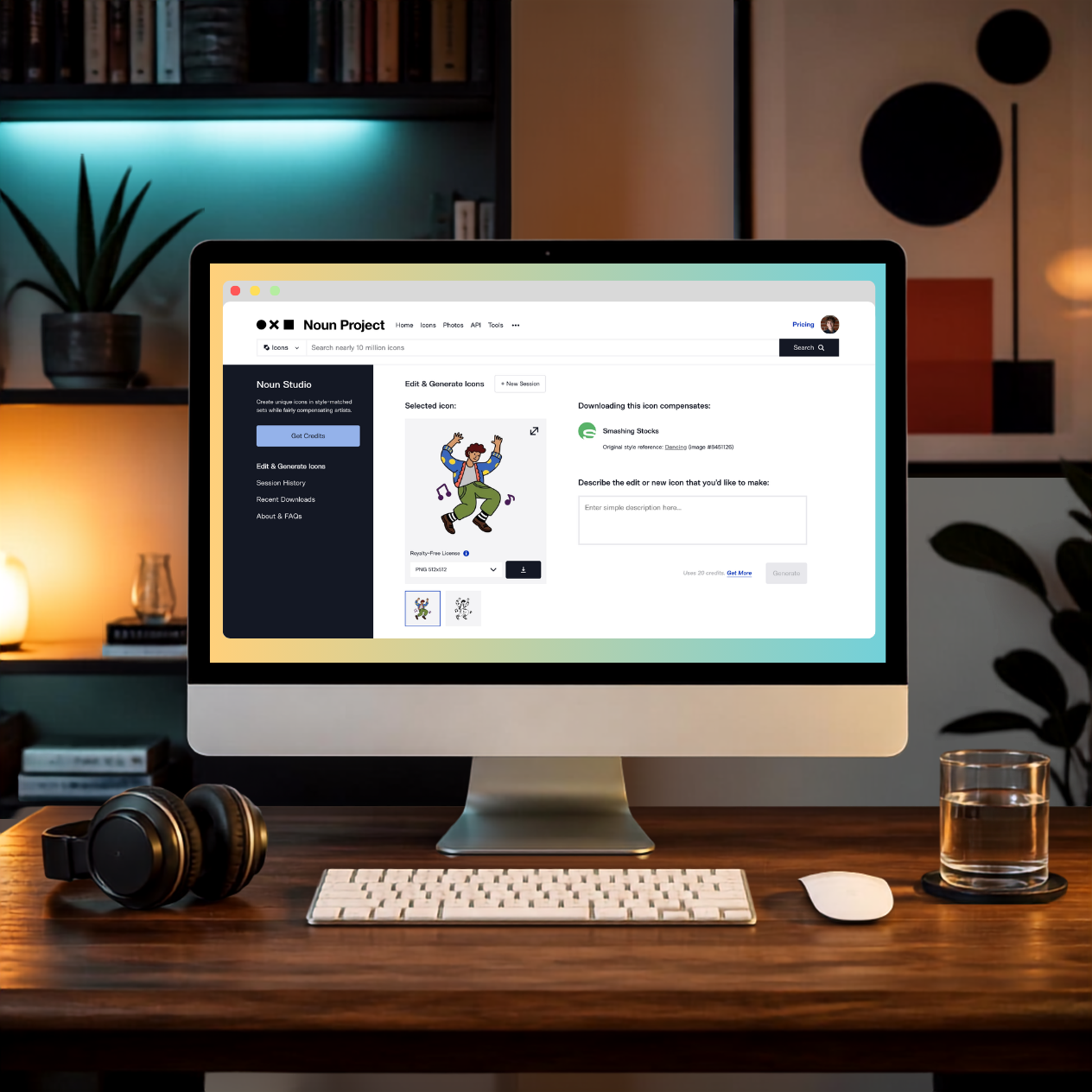
We’re thrilled to introduce Noun Studio—a specialized icon editor and generator designed to deliver precise, visually consistent results while compensating the human designers whose work is used as a reference.
Start with an icon from Noun Project’s collection, then use a simple text prompt to customize it, generate a new icon in the same visual style, or build a cohesive icon set.
Noun Studio combines the accessibility of generative technology with Noun Project’s distinctive collection of human-created designs, giving you greater creative control and more consistent results than general-purpose image generators.
Noun Studio can be used to:
- Adjust line weight and style
- Add color fills and colorful details
- Add, remove, or refine visual details
- Change the subject or composition
- Generate new icons in the same visual style
- Build cohesive matching icon sets

For example, you could start by generating a parrot icon using the style of the pigeon above, then ask Noun Studio to generate a matching monkey. From there, you could continue refining the monkey with additional prompts—such as showing it holding a banana, making the line weight thinner, or adding color—all while preserving the visual language established by the original reference icon.

Why We Built Noun Studio
Since 2010, Noun Project has grown into a trusted source for art-quality, human-created icons, with more than 10 million icons spanning countless visual styles.
Over the years, we heard our customers request features that make it easier to customize icons and complete matching sets. Changes that sound simple—adjusting line weight, recoloring an icon, changing a detail, or creating a missing icon in the same style—can require significant time and specialized vector-editing software.
More recently, customers have also begun turning to general-purpose image generators for these needs. We saw an opportunity to build something better for iconography: a specialized experience that combines Noun Project’s icon expertise with generative technology, while creating new earning opportunities for our creator community.
Specialized for Better Icon Results
General-purpose image generators are built to produce many kinds of visuals. Noun Studio is specialized for icons, giving you greater precision, consistency, and control when editing icons, generating visually matching icons, and building cohesive icon sets.

Noun Studio is designed around the qualities that make icons effective: clear concepts, simple compositions, consistent line weights, cohesive visual styles, and usability across sizes. And because every edit and generation begins with a human-created Noun Project icon, the reference gives Noun Studio a specific visual language to preserve as you customize or generate new icons.
Simply describe what you want to change, review the result, and continue refining it until it‘s perfect for your project.
Built to Support Human Creators
Noun Project has spent more than 15 years supporting a global community of designers. We believe generative technology should recognize and compensate the human creators whose work helps make it useful. That principle is built directly into how Noun Studio works.
Every icon edited or generated with Noun Studio begins with a specific human-created Noun Project icon. Provenance keeps the resulting work connected to that original icon and its creator, even through multiple rounds of editing or generation. When a resulting icon is downloaded, the original creator receives a royalty.
Participation is optional. Creators can choose whether their icons are available for use in Noun Studio and can update that preference through their Creator Dashboard. Customers can also see when an icon is unavailable for Noun Studio.
Noun Project did not train an image generation model using creator’s icons. Noun Studio combines internally developed knowledge from more than 15 years of working with icon design and SVGs with third-party models selected for specific tasks.
We also donate 1% of Noun Studio profits to carbon removal efforts through Stripe Climate, as part of our broader effort to develop Noun Studio thoughtfully and responsibly.
How to Use Noun Studio
We designed the user experience for Noun Studio to be simple and straightforward:
- Browse Noun Project’s collection, find a participating icon you love, and select the icon to visit it’s detail page.
- Select “Edit in Noun Studio” on the right-hand side of the icon’s detail page.
- Describe what you want to edit or generate. For best results, keep prompts simple, focus on one or two changes at a time, and let the reference icon guide the visual style. See our Best Practices for more tips. When you’re ready, select “Generate.”
- Download the finished icon for use in your project.

Standard downloads are provided as 512 × 512 px PNG files. Upscaled PNGs and editable SVG downloads are also available directly in Noun Studio, so you don’t need a separate vectorization or upscaling tool. You can find all the icons you’ve generated in previous sessions on the left sidebar menu of Noun Studio.

Noun Studio uses credits, which can be purchased directly in the product or on our pricing page. Noun Pro subscribers save 10% on Noun Studio edits and generations, with free SVG conversion and PNG upscaling.
Licensing & Privacy
Icons edited or generated through a paid Noun Studio offering include a Royalty-Free Commercial License for personal and commercial use. No attribution to the creator of the original reference icon is required. Noun Studio icons may not be resold as stock assets or submitted to Noun Project or similar or competing icon marketplaces or services.
Icons edited or generated with Noun Studio remain private to your account and are never added to the Noun Project icon collection. Our collection remains entirely human-created and reviewed by our team of human moderators.
Continuing Our Commitment to Creators & Thoughtful Design
Technology is rapidly changing how people create, but our commitment to thoughtful design and the creative community behind Noun Project remains the same.
Our goal with Noun Studio is to give our customers a better option when they need to edit or generate icons—one that combines the speed and accessibility of generative technology with the quality, diversity, and human creativity that have defined Noun Project for more than 15 years.
We believe this is a more thoughtful and responsible way to use generative technology, and we’re excited to see what you create with Noun Studio.
If you have questions about Noun Studio, please visit our FAQs or contact us at info@thenounproject.com.
Dancing Icon by Smashing Stocks
Pigeon Icon by Fauzi Arts


